PDF 1.4 Document Structure
Generate the output using the older PDF structure required by the supported PDF/A-1b profile. Source object streams, encryption and interactive content are not inherited.

Create a flattened, image-only PDF/A-1b document from selected pages.
Drop files here or use the button below.
Up to 100 MB total · Files stay on your device
Preview the document here. For added content, this is a placement guide; check the saved output.
Make an image-only archival copy using the PDF/A-1b profile. The new document uses a PDF 1.4 structure and stores each selected page as an RGB image with an embedded sRGB profile. Visible transparency is flattened into the page image.
The copy retains rendered appearance at the chosen resolution. It does not retain selectable characters, form fields, clickable links, original layers, attachments or digital signatures. PDF/A-1b is the specific output profile; this tool does not produce PDF/A-1a accessibility conformance.
Generate the output using the older PDF structure required by the supported PDF/A-1b profile. Source object streams, encryption and interactive content are not inherited.
Render overlapping colors and transparent elements into an opaque white-backed image. The exported page contains no live transparency masks from the original document.
Include the same pinned sRGB profile for image interpretation and the document's output intent. The archive copy does not rely on an external color-profile file.
Inspect the generated metadata, page resources and image streams against the supported output structure. Independent release tests also verify representative files with the PDF/A-1b veraPDF profile.
Select the PDF and decide which visible pages belong in the copy.
Select the screenshot to enlarge it.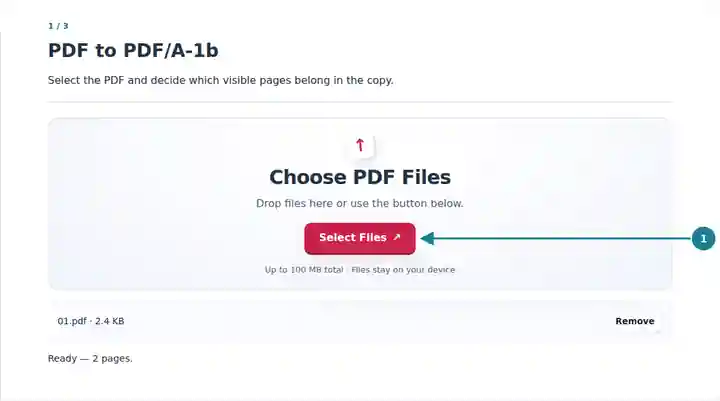
Review the profile, resolution and image-only acknowledgment.
Select the screenshot to enlarge it.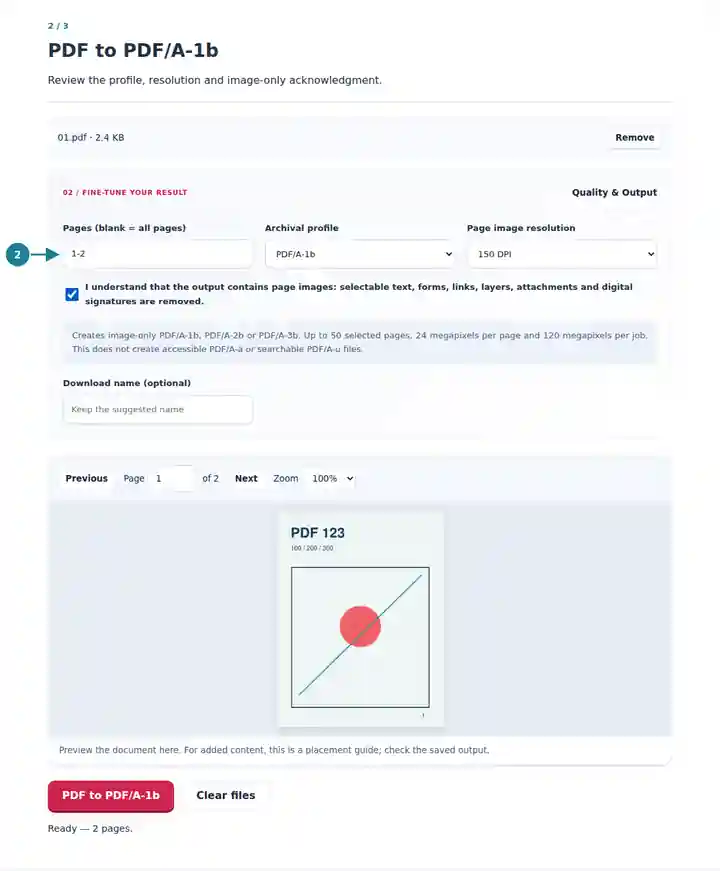
Save the result and inspect text, highlights and overlapping graphics.
Select the screenshot to enlarge it.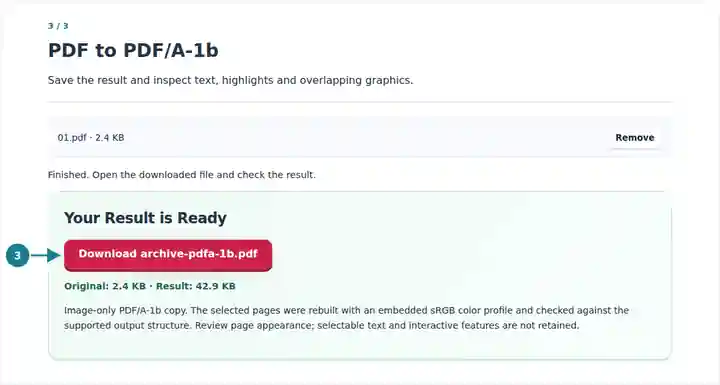
Screenshots show this toolkit using harmless sample files. Your file name, page count and settings may differ.
Choose this profile when a receiving workflow specifically asks for PDF/A-1b and accepts image-only pages. A visual derivative can simplify records that combine different source features, but it does not preserve the original document's logical structure. If a submission calls for tagged accessibility, searchable text or a retained digital signature, select a workflow designed for those requirements instead of treating level-b output as equivalent.
Produce a visual copy for a system that explicitly accepts PDF/A-1b page images.
Record the visible state of completed pages without carrying interactive form fields into the derivative.
Keep a fixed visual arrangement of selected pages while retaining the source material and its context.
| Setting | What to Expect |
|---|---|
| Selected profile | PDF/A-1b by default; PDF 1.4 output with page images and an embedded sRGB profile. |
| Input and selection | One PDF up to 100 MiB and 500 source pages; up to 50 selected pages. |
| Resolution | 72, 150, 200 or 300 DPI. Choose higher detail only when it remains within the pixel limits. |
| Resource limits | 24 megapixels per page, 120 megapixels per job and 160 MiB generated output. |
| Removed features | Selectable text, interactive fields, links, layers, attachments and original digital-signature objects. |
Convert a page containing a translucent highlight over colored text at 200 DPI. In the output, inspect the overlap and check that the words remain legible. The highlight's appearance is now part of an opaque image, so it cannot later be moved or removed independently. Keep the editable source if that may be necessary.
| Situation | What to Check |
|---|---|
| Small text looks soft | Try 200 or 300 DPI on a smaller selection and compare the result at a practical reading size. |
| A form is no longer interactive | That is expected. Its visible appearance can be retained, but the form field itself is removed during reconstruction. |
| The recipient asks for PDF/A-1a | PDF/A-1b does not provide the requested level-a structure. This converter cannot satisfy that requirement by changing a label. |
No. Their visible overlap is rendered into the page image. The result contains opaque images rather than the original transparency objects.
This generated PDF/A-1b copy is unencrypted. Adding encryption afterward would change the archival conformance of the file.
No. Rebuilding pages as images can increase file size, especially for a compact text PDF. Resolution controls detail and size, not a guaranteed compression result.