Explicit Level-b Profile
Generate the supported PDF/A-2b structure with matching archival identification. The tool does not claim PDF/A-2a accessibility or PDF/A-2u Unicode text conformance.

Create an image-only PDF/A-2b copy with visible page geometry applied.
Drop files here or use the button below.
Up to 100 MiB total · Files stay on your device
Preview the document here. For added content, this is a placement guide; check the saved output.
Create a new PDF/A-2b document from selected visible pages of a PDF. The generated PDF uses a PDF 1.7 structure, page images and embedded sRGB color information. Existing page rotation and cropping are applied when the images are rendered.
The PDF/A-2b profile does not change this tool's image-only approach. Even where the standard permits richer content, this converter rebuilds page images and removes selectable text, interactive fields, links, layers, attachments and original digital-signature objects.
Generate the supported PDF/A-2b structure with matching archival identification. The tool does not claim PDF/A-2a accessibility or PDF/A-2u Unicode text conformance.
Apply the source page's visible crop and rotation to the new image page. A rotated landscape sheet remains oriented as rendered, without copying hidden material outside its crop.
Choose from four DPI values when the source combines text, diagrams or scans. Check a representative page because the most demanding page may determine a practical resolution.
Verify the generated page resources, image lengths, metadata and pinned color profile before download. Representative release outputs are independently tested against veraPDF's PDF/A-2b profile.
Choose the document and inspect its visible page orientation.
Select the screenshot to enlarge it.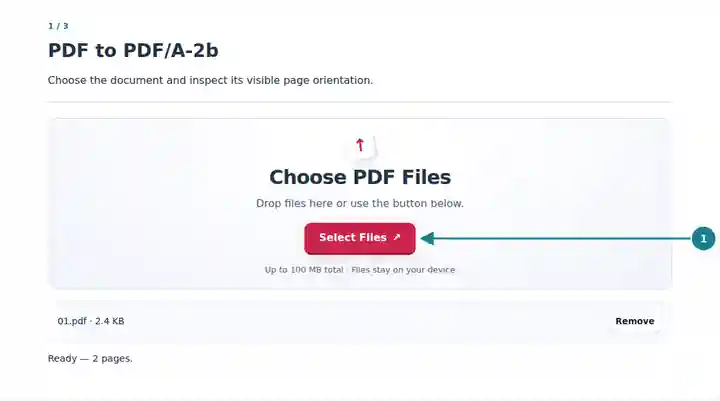
Keep PDF/A-2b selected and choose the page range and DPI.
Select the screenshot to enlarge it.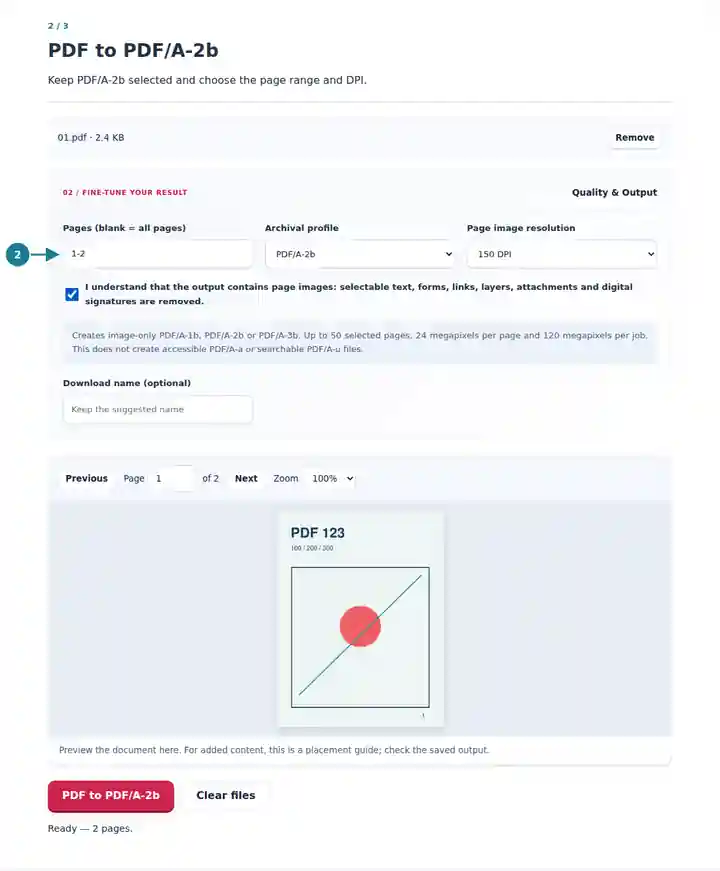
Download the output and compare the visible page boundaries and detail.
Select the screenshot to enlarge it.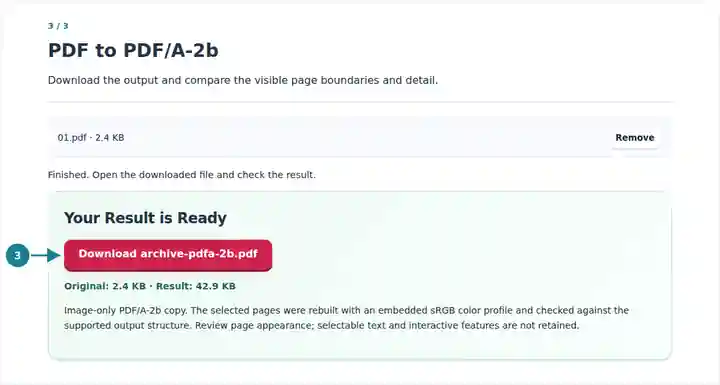
Screenshots show this toolkit using harmless sample files. Your file name, page count and settings may differ.
This conversion is useful when a workflow requests PDF/A-2b and accepts a visual derivative of the record. It gives the selected pages a consistent, limited output structure even when their source features differ. Keep the original when you need editable form data, text extraction or signed-document evidence. The output profile is a file-format property; it does not determine which record version your organization should retain.
Prepare a visible-page copy for an established workflow that specifies the PDF/A-2b profile.
Preserve the rendered orientation of mixed portrait and landscape pages for later inspection.
Create a consistent visual derivative of selected material alongside the original source documents.
| Setting | What to Expect |
|---|---|
| Profile and structure | PDF/A-2b by default, using PDF 1.7 and embedded RGB page images. |
| Source and pages | One PDF up to 100 MiB and 500 source pages; at most 50 selected pages. |
| Resolution | 72, 150, 200 or 300 DPI; 24 megapixels per page and 120 megapixels per job. |
| Output limit | Up to 160 MiB. Each visible page side must be between 3 and 14,400 PDF points. |
| Search and interaction | No retained text layer, forms, clickable links, layers, attachments or original digital signatures. |
For a report with portrait text pages and a rotated landscape drawing, convert one example of each at 150 DPI first. Check the drawing's orientation and visible boundary. If small labels are unclear, repeat that sample at a higher DPI within the limits, then use the setting appropriate for the material you need to preserve.
| Situation | What to Check |
|---|---|
| A large technical page exceeds the limit | Reduce DPI for that page or prepare a smaller visible page in the source workflow. The limit is based on pixels, not only file size. |
| Searching finds no words | The export is image-only. Selecting PDF/A-2b does not add or preserve a searchable text layer. |
| The destination requires PDF/A-2u | This tool produces the level-b profile. A Unicode-text requirement needs a different conversion workflow with a verified text layer. |
Create an image-only PDF/A-2b copy with visible page geometry applied.
Settings used: {"range": "1", "pdfaConfirm": true, "pdfaPart": "2"}
Compare the source and result before relying on this tool. This sample checks a bounded operation; output mode and document-structure limitations still apply.
Checked on . Small synthetic sample processed with release 3.23.0 in Chromium 153. This is a recorded local check, not a live-host or every-document guarantee.
No. The standard's permitted features and this converter's implemented subset are different scopes. This tool deliberately rebuilds the selected pages as images.
The source page's rendered rotation is applied to its new page image. Review the result if the original file has unusual rotation or cropping settings.
The new document does not retain the source signature object or its cryptographic validity. Keep the signed original whenever that evidence is required.