Complete File Encoding
Preserve every original PDF byte in the encoded payload. Decoding the payload correctly restores the same file without a PDF rewrite.

Encode a complete PDF as Base64 text or a PDF data URI.
Drop files here or use the button below.
Up to 25 MB total · Files stay on your device
Preview the document here. For added content, this is a placement guide; check the saved output.
Represent a PDF's bytes as Base64 characters and save them in a text file. Choose plain Base64 when another system expects the encoded payload alone, or a PDF data URI when it requires the media type and encoding prefix as well.
The whole file is encoded, including its existing pages and document features. This changes how the bytes are represented; it does not translate the text, reduce file size, encrypt the document or remove active content.
Preserve every original PDF byte in the encoded payload. Decoding the payload correctly restores the same file without a PDF rewrite.
Download plain Base64 or a string beginning with data:application/pdf;base64,. Select the form expected by the receiving application.
Read and encode the selected file in your browser. The conversion does not send the PDF to a remote encoding service.
Save the result as a .txt file rather than displaying a very large payload inside the page. Keep it with the source for controlled transfer or testing.
Select the complete document you want to encode.
Select the screenshot to enlarge it.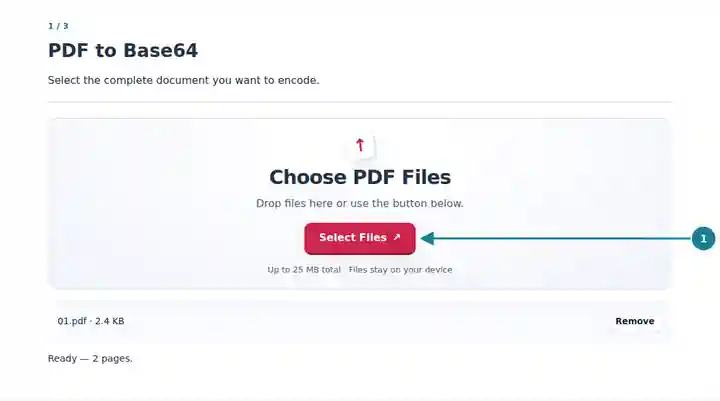
Select plain Base64 or a PDF data URI.
Select the screenshot to enlarge it.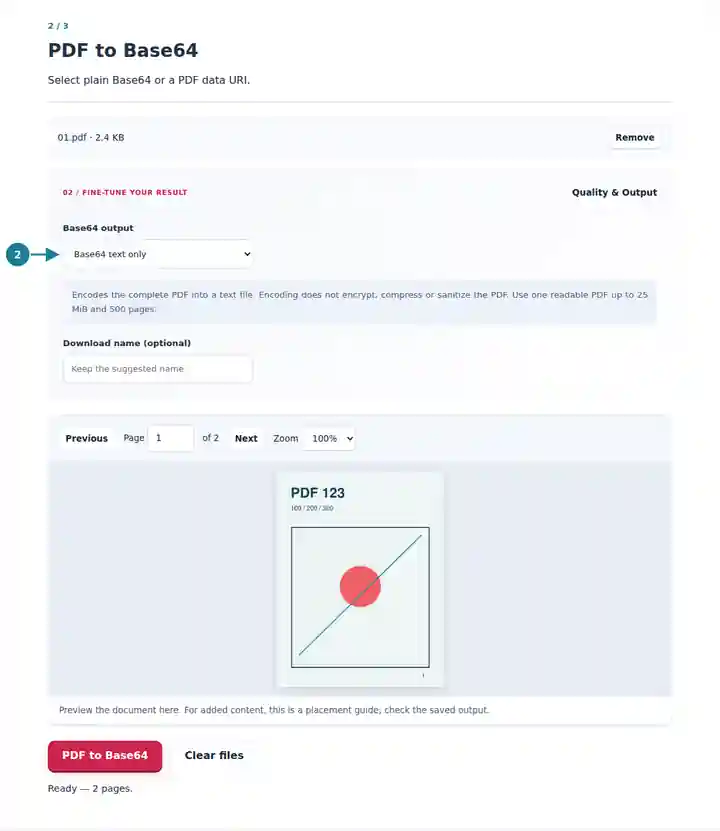
Download the text payload for your receiving application.
Select the screenshot to enlarge it.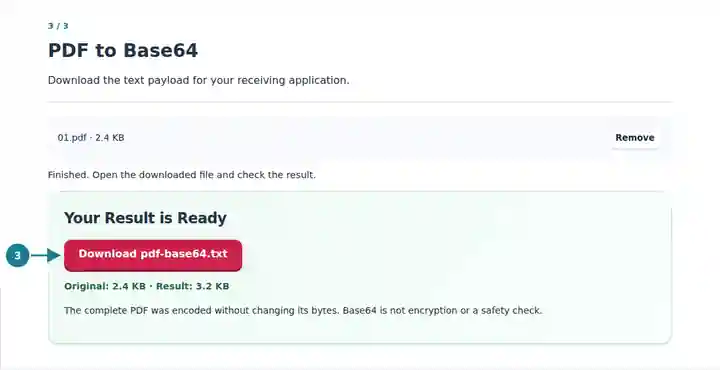
Screenshots show this toolkit using harmless sample files. Your file name, page count and settings may differ.
Some interfaces transport binary files inside text-based messages. Base64 provides that representation, but the surrounding interface still defines payload limits, required fields and authentication. This tool prepares the encoded file; it does not submit an API request or configure the receiving system. Base64 usually increases size, so check both the PDF size and the permitted message size.
Prepare a small PDF payload for an interface that explicitly requires Base64.
Create repeatable encoding and decoding samples without changing the original document.
Inspect whether a transfer problem concerns a missing prefix, truncated text or incorrect decoding.
| Setting | What to Expect |
|---|---|
| Input | One unencrypted PDF up to 25 MiB, with no more than 500 pages. |
| Plain Base64 | Only the standard padded Base64 payload, followed by a newline in the text download. |
| PDF data URI | The same payload prefixed with data:application/pdf;base64,. |
| Scope | The complete source file is encoded. There is no page-range selection or content sanitization. |
If an API field expects Base64 bytes, use the plain option. If an interface asks for a PDF data URI, choose that option instead. A correct payload can still fail when its prefix is unexpected or the message is truncated; test with a small known PDF before transferring a larger file.
| Situation | What to Check |
|---|---|
| The destination rejects the payload | Check whether it expects plain Base64, a data URI or a different surrounding request format. |
| The encoded result is larger than the PDF | That is expected for this text encoding. Use a smaller PDF if the receiving system has a message-size limit. |
| An encrypted file cannot be read | Unlock it using the password you are authorized to use, then encode the resulting PDF. |
No. Anyone with the encoded text can decode it. Apply the same access controls to the Base64 file as to the original PDF.
No. The original bytes remain unchanged. Encoding is not a malware scan, document cleanup or signature-validation step.
This tool encodes the entire file. Use Extract PDF Pages first to create a document containing only the pages you intend to encode.