HEIC and HEIF Containers
Select one supported HEIC or HEIF container up to 20 MB. A job can decode up to 20 still images, with a maximum of 50 megapixels per image.

Convert supported HEIC or HEIF still images to PDF, with a 50 MP limit per image.
Drop files here or use the button below.
Up to 100 MB total · Files stay on your device
Preview the document here. For added content, this is a placement guide; check the saved output.
Convert a supported HEIC or HEIF image into a PDF using a local browser image decoder. This helps when a recipient accepts PDF documents but cannot open the camera image’s original container. The result contains the image’s rendered appearance.
HEIC files can contain multiple related images, thumbnails and color information. The decoder’s supported interpretation determines what can be converted. Review the output carefully, particularly for unusual camera modes and HDR images.
Select one supported HEIC or HEIF container up to 20 MB. A job can decode up to 20 still images, with a maximum of 50 megapixels per image.
Embed decoded still images without adding an extra lossy JPEG stage; appearance remains limited by the decoder and source file.
Fit the photo to standard or custom paper, or match page dimensions to the decoded image using Source image DPI.
Decode the photo and build PDF pages in your browser. Live Photo motion, depth maps and every camera attribute are not preserved.
Choose one supported HEIC or HEIF container: up to 20 MB, 20 still images and 50 MP per image.
Select the screenshot to enlarge it.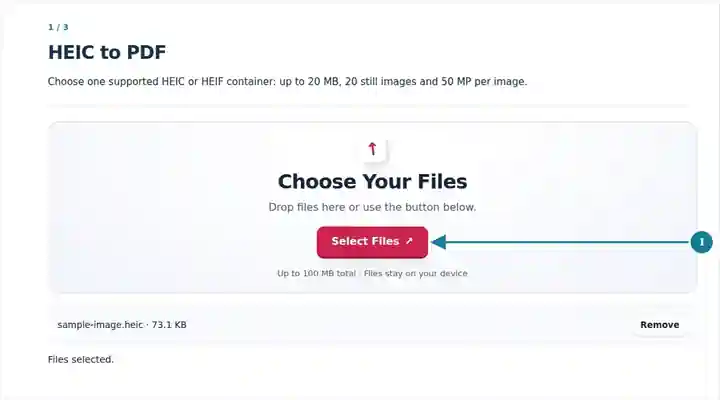
Set the PDF page dimensions and margins for the decoded still images.
Select the screenshot to enlarge it.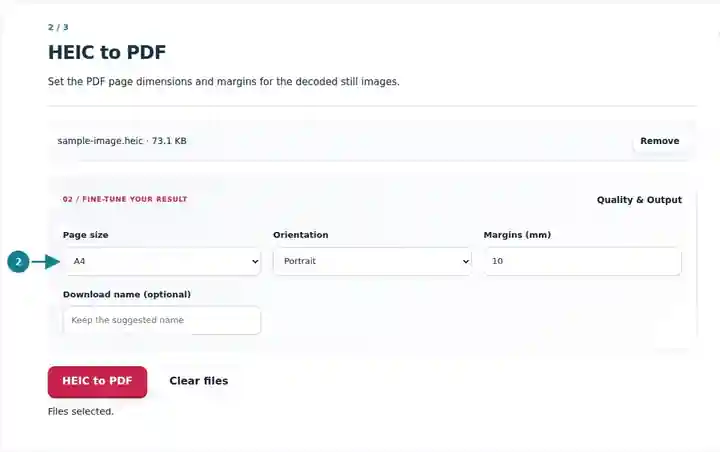
Download the PDF and compare image content, orientation and colour with the phone original.
Select the screenshot to enlarge it.
Screenshots show this toolkit using harmless sample files. Your file name, page count and settings may differ.
A phone may save a document photograph as HEIC while a submission portal accepts PDF. Converting the supported still image provides a document copy that can be viewed as a page. Check whether the receiving organization accepts a photographed copy before preparing it. For several separate HEIC files, convert each container and merge the checked PDFs afterward. Retain the phone originals, especially when color information or camera data is important.
Convert a phone photograph of a completed form into the requested document format. Check all corners, handwriting and orientation before uploading to the institution’s portal.
Prepare a still-image receipt copy captured on a phone. Compare amounts and dates with the original photo; a glare spot must be corrected by retaking the picture.
Share a supported phone image of a delivery note or equipment label. Inspect color-coded details and use a standard JPG export if the HEIC variant cannot be decoded.
| Setting | What to expect |
|---|---|
| Accepted input | HEIC, HEIF |
| Processing location | Your browser, on your device |
| File selection | One input file |
| Input size | One container up to 20 MB; up to 20 decoded still images, each no larger than 50 megapixels |
The browser loads the HEIC decoder when needed and embeds the decoded image without an extra lossy JPEG step. Conversion does not create searchable text. Some newer HEIC variants, HDR data, depth maps and camera metadata may not carry into the PDF. Export a JPG or PNG from your photo application if decoding fails.
A phone preview can apply color or HDR display treatment that a standard PDF reader will not reproduce in the same way. For a product or material photograph, compare a neutral area and a bright highlight in the exported PDF with the original. If the result is unsuitable, use your photo application’s ordinary JPG or PNG export and compare that separate conversion.
A container can produce more than one supported still image. Count the PDF pages instead of assuming that one HEIC file always equals one final page. Keep the phone original for motion, depth information or camera adjustments; a reading copy of the decoded still images cannot replace those source capabilities.
| Situation | What to do |
|---|---|
| Your file is not recognized | Check that it is a real HEIC/HEIF container, not a renamed JPEG or video. |
| Colors differ from the phone display | HDR and wide-color interpretation may differ. Compare a standard JPEG export from the device. |
| The source exceeds the pixel limit | Export a smaller still image in your photo application. Each decoded image must be at most 50 megapixels; reducing container bytes alone may not reduce its pixel dimensions. |
For a photographed document, inspect all four corners, small writing and the page orientation after download. If the photo contains a glare spot or an out-of-focus section, retake it before conversion. A different file format cannot recover writing that the camera did not capture.
Supported files can be converted with the bundled browser decoder. Some camera-specific variants may need a JPG export first.
The output is the decoder’s PDF rendering. Do not assume that HDR appearance or all container metadata will carry across.
This browser operation accepts one container per job. Merge the generated PDFs if you need one combined document.
Continue with JPG to PDF, Merge PDF, OCR PDF.