Profile-Specific Visual Output
Use PDF/A-3b when that exact profile is required and an image-only derivative is acceptable. The output does not claim level-a accessibility or level-u Unicode text conformance.

Generate an image-only PDF/A-3b visual copy without embedded attachments.
Drop files here or use the button below.
Up to 100 MiB total · Files stay on your device
Preview the document here. For added content, this is a placement guide; check the saved output.
Create a visual archival derivative with the PDF/A-3b profile. Selected pages are rendered into RGB images inside a new PDF 1.7 document, with embedded sRGB color information and PDF/A-3b identification.
PDF/A-3 can support embedded associated files, but this converter does not create that type of package. It removes source attachments and produces page images only. It does not generate an electronic invoice, attach XML or preserve the original document's selectable text and interactive features.
Use PDF/A-3b when that exact profile is required and an image-only derivative is acceptable. The output does not claim level-a accessibility or level-u Unicode text conformance.
Build the new document from rendered pages without copying embedded files from the source. Required information stored only in an attachment must be handled separately in the receiving workflow.
Set 72, 150, 200 or 300 DPI and select the page range. The output records visible page appearance at that resolution, rather than preserving original editable objects.
Check the generated metadata, output intent, page tree and image streams before download. Representative release fixtures are also independently validated with the PDF/A-3b veraPDF profile.
Choose the document and identify any required embedded supporting files.
Select the screenshot to enlarge it.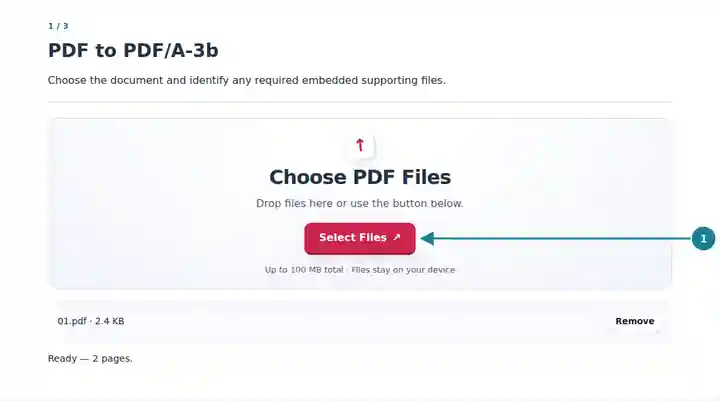
Keep PDF/A-3b selected, choose DPI and acknowledge the removed features.
Select the screenshot to enlarge it.
Save the visual copy and retain required original files separately.
Select the screenshot to enlarge it.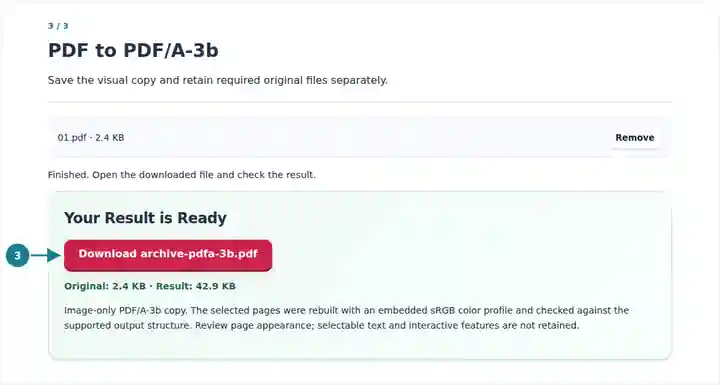
Screenshots show this toolkit using harmless sample files. Your file name, page count and settings may differ.
Use this converter for a workflow that requests the PDF/A-3b profile and needs only a visual copy of the selected pages. The profile alone does not turn a document into a structured invoice or a complete records package. If the recipient expects associated XML, a specific invoice schema or preserved supporting attachments, this page-image output does not meet those additional requirements.
Prepare a page-image derivative for a process that explicitly accepts the PDF/A-3b profile without associated files.
Check that a requested profile and the actual deliverable match before transferring a visible-page copy.
Compare rendered page content with the original while tracking supporting files as separate records.
| Setting | What to Expect |
|---|---|
| Default profile | PDF/A-3b, using a new PDF 1.7 structure with RGB page images and an embedded sRGB profile. |
| Input and selection | One PDF up to 100 MiB and 500 source pages; up to 50 selected pages. |
| Image limits | 72, 150, 200 or 300 DPI; 24 megapixels per page and 120 megapixels per job. |
| Generated file | Maximum 160 MiB. No embedded source files or newly attached XML. |
| Removed content objects | Selectable text, forms, links, layers, attachments and original digital-signature objects. |
Before converting a document that contains an embedded spreadsheet, decide whether the receiving workflow needs that spreadsheet. This converter can retain the rendered pages, but it will not carry the embedded workbook into the new PDF/A-3b. Keep the workbook and original PDF separately, or use the required associated-file packaging workflow if the recipient expects one combined submission.
| Situation | What to Check |
|---|---|
| An attachment is missing from the result | Attachments are intentionally excluded from this image-only converter. Use the original file to retrieve and preserve any required supporting material. |
| An invoice system rejects the file | Check its invoice and associated-data requirements. A PDF/A-3b visual copy is not automatically a structured electronic invoice. |
| The output is too large | Reduce resolution or convert a smaller page range. A short source PDF can still contain pages that render into large images. |
Generate an image-only PDF/A-3b visual copy without embedded attachments.
Settings used: {"range": "1", "pdfaConfirm": true, "pdfaPart": "3"}
Compare the source and result before relying on this tool. This sample checks a bounded operation; output mode and document-structure limitations still apply.
Checked on . Small synthetic sample processed with release 3.23.0 in Chromium 153. This is a recorded local check, not a live-host or every-document guarantee.
No. A permitted feature of a file format is not automatically present in every file. This converter adds no XML attachment and removes attachments inherited from the source.
No. It creates a page-image PDF/A-3b copy. It does not construct or validate invoice data, an invoice profile or the required associated-file package.
It creates a new visual derivative and removes the source signature object. Keep the original signed record and any required supporting files.