Image Decoding
Decode a still PNG or JPEG and fit it inside an A4 or US Letter PDF page. The image keeps its proportions and is not cropped.

Decode an encoded PDF or image, or print Base64 text as page images.
Drop files here or use the button below.
Up to 28 MB total · Files stay on your device
Preview the document here. For added content, this is a placement guide; check the saved output.
A Base64 string may represent a whole PDF, an image or other bytes. Choose the mode that matches your input: decode a PNG/JPEG image into a PDF, restore an already encoded PDF, or print the Base64 characters themselves as page images.
Upload the encoded text in a UTF-8 .txt or .base64 file. Standard padded Base64 and PNG, JPEG or PDF data URIs are accepted. The tool does not fetch a URL or decide the meaning of arbitrary encoded data for you.
Decode a still PNG or JPEG and fit it inside an A4 or US Letter PDF page. The image keeps its proportions and is not cropped.
Recover the original bytes when the payload already contains a readable PDF. Existing document features remain unchanged rather than being rebuilt.
Print the literal Base64 characters when you need an image-based record of the encoded text. This mode does not decode the underlying content.
Validate padding, permitted data URI types, decoded file signatures and image dimensions. Malformed input receives an error instead of a mislabeled PDF.
Choose the local text file containing Base64 data.
Select the screenshot to enlarge it.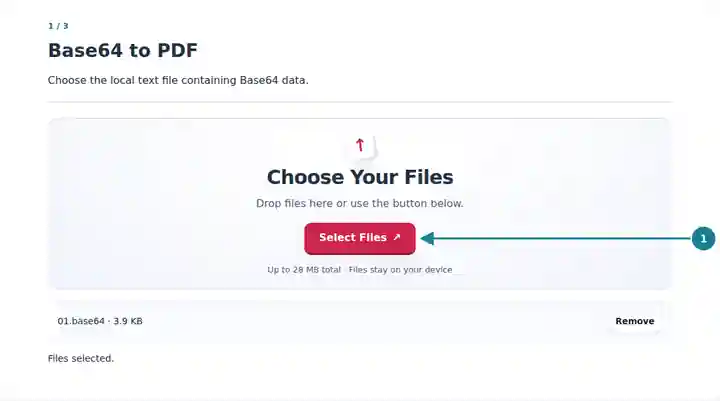
Select image decoding, original PDF restoration or literal text printing.
Select the screenshot to enlarge it.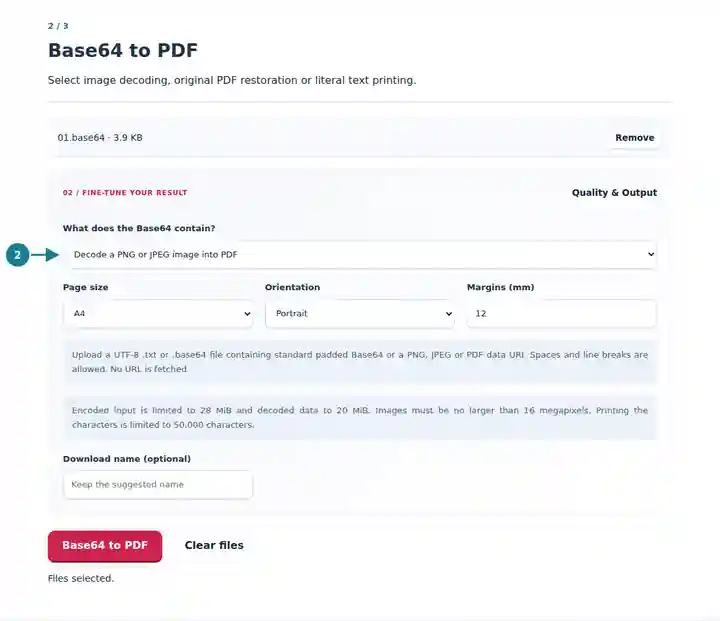
Download the PDF and confirm that its content matches the selected mode.
Select the screenshot to enlarge it.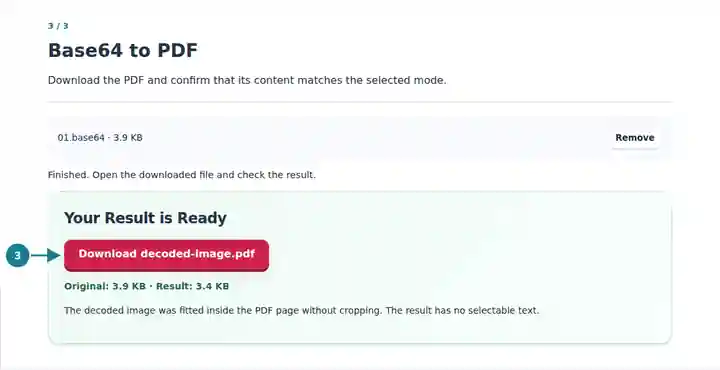
Screenshots show this toolkit using harmless sample files. Your file name, page count and settings may differ.
Decoding an image, restoring a PDF and printing encoded characters produce different results. An integration tester may need the original PDF bytes, while a reviewer may need a page showing an encoded sample. Selecting the purpose explicitly prevents a text listing from being mistaken for a decoded document.
Restore a PDF returned by an interface and compare it with a known source.
Turn a Base64-encoded PNG or JPEG into a proportionally fitted PDF page.
Create a visible, image-based record of a short encoded text sample.
| Setting | What to Expect |
|---|---|
| Encoded source | One UTF-8 .txt or .base64 file up to 28 MiB; decoded data up to 20 MiB. |
| Image mode | Still PNG or JPEG, up to 16 megapixels and 16,384 pixels on either side. Animated PNG is rejected. |
| Original PDF mode | A readable, unencrypted PDF with no more than 500 pages. Page layout settings do not apply. |
| Literal text mode | Up to 50,000 source characters; the output contains page images without a selectable text layer. |
A string starting with data:image/png;base64, declares an encoded PNG. Choose image decoding to place that image in the PDF. Choosing literal text instead prints the prefix and Base64 letters themselves. For a data URI beginning with data:application/pdf;base64, choose original PDF decoding to restore the encoded document.
| Situation | What to Check |
|---|---|
| The encoded text is invalid | Check for missing padding, truncation or unsupported characters. Standard spaces, tabs and line breaks are allowed. |
| The chosen mode rejects the decoded data | Use PDF mode for an encoded PDF and image mode for PNG/JPEG bytes. Renaming a different format does not convert it. |
| An image exceeds the dimension limit | Resize the original image before encoding it. The tool checks dimensions before bitmap decoding. |
No. Supply the encoded text in a local file. The converter does not request external image or document URLs.
No. The encoded PDF bytes are restored unchanged. Active content, signatures and other features are not cleaned or verified by this operation.
No. Literal mode renders the characters into page images. Keep the original text file when you need to copy, search or decode the payload.