Quoted Text Scalars
Keep words such as yes, dates, punctuation and colon-containing phrases as string values. Extracted text does not become YAML instructions or custom object tags.

Export PDF text items and their page positions as YAML data.
Drop files here or use the button below.
Up to 25 MB total · Files stay on your device
Preview the document here. For added content, this is a placement guide; check the saved output.
Create a YAML file containing text items extracted from selected PDF pages. The result includes source-page references, page geometry and text-position transforms, making it suitable for inspection in a text editor or a separate processing workflow.
The export does not interpret the document as application configuration. It cannot infer heading levels, extract pictures, recognize invoice fields or rebuild a table from its appearance. Its text follows the PDF reader's extraction order, which may differ from reading order.
Keep words such as yes, dates, punctuation and colon-containing phrases as string values. Extracted text does not become YAML instructions or custom object tags.
Selected pages retain their source numbers. Reviewers can return to the corresponding PDF page without counting output array positions.
Store text transforms, direction and page dimensions with the words. A downstream process can examine placement instead of assuming a ready-made table.
The output declares that semantic reconstruction and OCR were not performed. This helps another program treat the result as extracted evidence.
Choose a PDF containing the text you need to inspect.
Select the screenshot to enlarge it.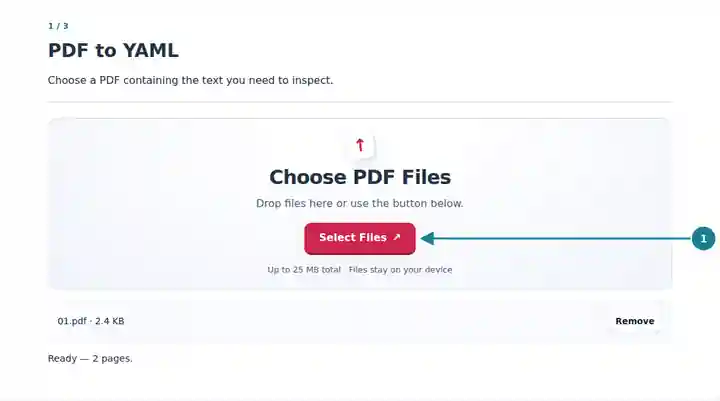
Start with a small set of source pages.
Select the screenshot to enlarge it.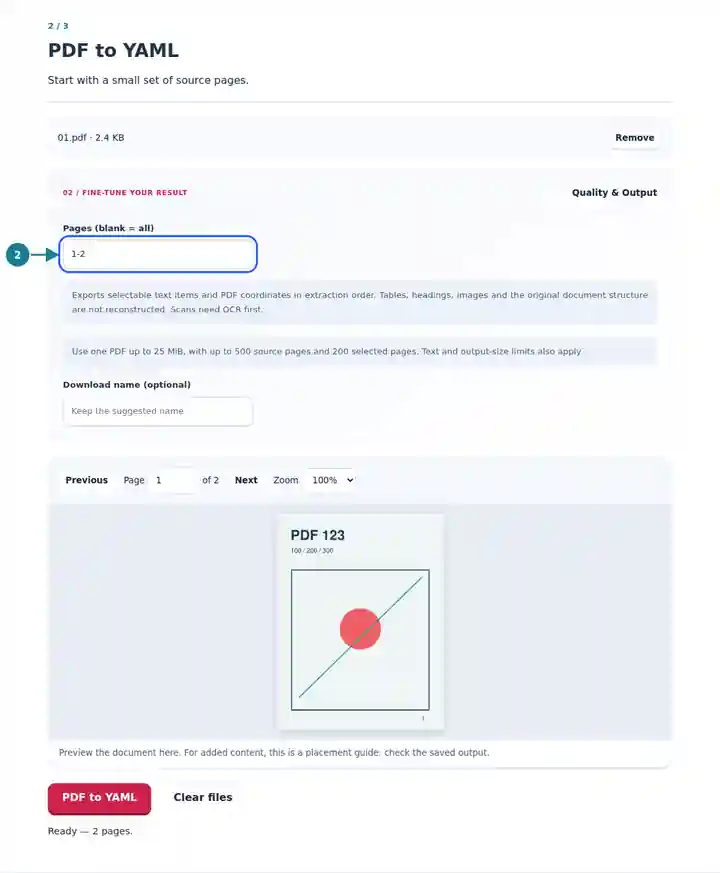
Save the output and inspect its quoted text values.
Select the screenshot to enlarge it.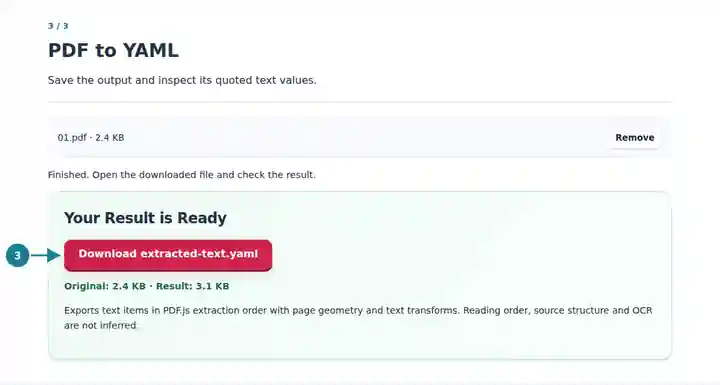
Screenshots show this toolkit using harmless sample files. Your file name, page count and settings may differ.
YAML can be convenient for text-based reviews where a team wants structured page information without a separate viewer. Use the export as document data and apply your own validation before importing it. A PDF statement should never become trusted configuration merely because its words are stored in a YAML file.
Inspect text and page references before designing extraction rules for a known document layout.
Keep a readable intermediate record while checking selected quotations and page locations.
Compare changes in extracted document data using tools that handle structured text files.
| Setting | What to Expect |
|---|---|
| Input file | One PDF up to 25 MiB and 500 source pages. |
| Selected pages | Up to 200 pages in the entered order; repeated page references appear once. |
| Extraction bounds | 20,000 items per page, 100,000 items per job and two million text characters. |
| YAML output | Declared YAML 1.2 with quoted string values; maximum download size 64 MiB. |
A form might contain the printed word yes beside a label and a number with leading zeros. Inspect those extracted strings in the YAML and compare them with the source. The export keeps text as quoted values, allowing your own application to decide whether a value is a label, identifier, date or something else.
| Situation | What to Check |
|---|---|
| The text contains Unicode escape sequences | A YAML parser can recover the original characters from the quoted escapes. This also keeps control characters from disrupting the file structure. |
| The output is not a ready-to-import configuration | It is an extraction record. Map and validate the fields required by your application separately. |
| The selection is too dense | Reduce the page range. A dense page can reach the text-item or character limit before the page limit. |
No. It reads a PDF and creates YAML output. It does not load uploaded YAML, execute tags or apply configuration settings.
No automatic OCR is performed. Run OCR on an image-only PDF first, then inspect the recognized text before exporting it.
Not necessarily. Multi-column pages and positioned labels can produce a different extraction order. Review their coordinates and the original page.