Real DjVu Decoding
The bundled DjVu.js library decodes the document’s image data. The result is a new PDF page image rather than a DjVu attachment or a renamed source file.

Decode self-contained DjVu documents into PDF page images.
Drop files here or use the button below.
Up to 50 MiB total · Files stay on your device
Preview the document here. For added content, this is a placement guide; check the saved output.
Convert a self-contained DjVu document into a PDF of decoded page images. Single-page files and bundled documents are supported when their required image data is included. Select specific pages or convert the whole document within the stated limits.
An indirect DjVu index depends on separate page files. That input is rejected because this tool accepts one local document and does not fetch its dependencies from another location. Existing DjVu text layers, links and bookmarks are not transferred to the PDF.
The bundled DjVu.js library decodes the document’s image data. The result is a new PDF page image rather than a DjVu attachment or a renamed source file.
Choose the required page numbers from a bundled document. Smaller selections are easier to inspect and can fit memory limits that a whole scanned book would exceed.
Decoded page images follow their stored rotation. Each PDF page uses the decoded pixel dimensions and source resolution information to determine its physical size.
The selected file is read locally. Missing indirect pages are not fetched, document links are not activated and the DjVu is not uploaded.
Select a complete DjVu document stored in one file.
Select the screenshot to enlarge it.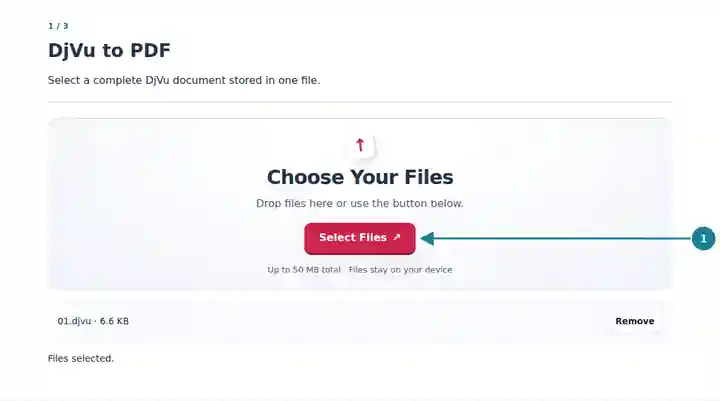
Select the pages that fit the decoding limits.
Select the screenshot to enlarge it.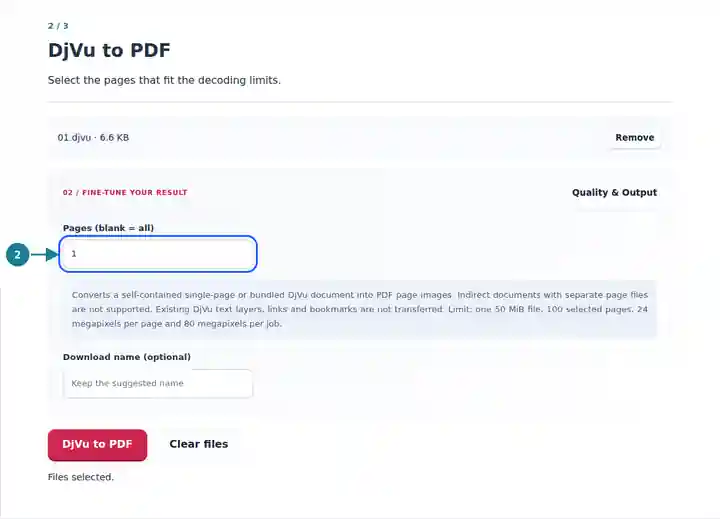
Save the PDF and inspect page count, rotation and readability.
Select the screenshot to enlarge it.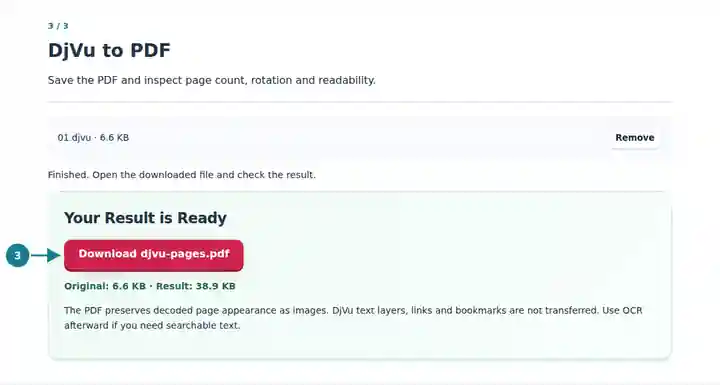
Screenshots show this toolkit using harmless sample files. Your file name, page count and settings may differ.
A PDF copy helps recipients and document systems that cannot open DjVu view or print selected pages. It does not add missing scan detail, repair damaged pages or create searchable text automatically. Retain the DjVu if you still need its original navigation or text information.
Make a readable PDF copy of selected reference pages while retaining the source document and citation details.
Open course material in a PDF reader when a self-contained DjVu file was supplied.
Prepare a viewable copy for a workflow that accepts PDF page images and verify that every required page is present.
| Setting | What to Expect |
|---|---|
| Input | One self-contained .djvu or .djv file up to 50 MiB, with no more than 500 source pages. |
| Selection | Up to 100 selected pages. A blank range includes all pages only when they fit the limits. |
| Decoded Images | Up to 24 megapixels per page and 80 megapixels across the selected pages. |
| Output | One PDF containing page images. Original DjVu text layers, links and bookmarks are not copied. |
If a bundled report has a large scanned appendix, begin with the few pages needed for your review. Enter the page range and check that the PDF has the expected number of pages. Compare a small caption and a rotated diagram with the source. If you later run OCR, inspect names, numbers and unusual symbols separately.
| Situation | What to Check |
|---|---|
| The document requires separate page files | Choose a bundled copy that includes its page data. An indirect index is not the complete document. |
| The selection exceeds the image limit | Select fewer pages. A single very large scan can exceed the per-page limit even when the compressed file is small. |
| The PDF has no selectable text | This converter creates page images. Use OCR afterward if text selection or search is required. |
Decode self-contained DjVu documents into PDF page images.
Settings used: {"range": "1", "dpi": "72"}
Compare the source and result before relying on this tool. This sample checks a bounded operation; output mode and document-structure limitations still apply.
Checked on . Small synthetic sample processed with release 3.23.0 in Chromium 153. This is a recorded local check, not a live-host or every-document guarantee.
No. The PDF contains decoded page images. Run OCR on the result if searchable text is needed, then review the recognition output.
An indirect index refers to other files and cannot supply all its pages alone. This tool requires a self-contained or bundled document and does not download dependencies.
No. DjVu and PDF can encode page images differently. The PDF can be larger, especially for material whose DjVu image compression was already efficient.