One Section per Source Page
The HTML labels the selected source pages so a reader can return to the corresponding PDF page.

Create a simple HTML document from the PDF text layer.
Drop files here or use the button below.
Up to 100 MiB total · Files stay on your device
Preview the document here. For added content, this is a placement guide; check the saved output.
Export selectable PDF text into a simple HTML document with a section for each selected page. The result is useful as a readable text reference or as a starting point for web editing.
The tool escapes extracted characters and does not recreate interactive PDF content or original CSS. The result is a text representation rather than a pixel-matched website version of the PDF.
The HTML labels the selected source pages so a reader can return to the corresponding PDF page.
Extracted characters are escaped for HTML. PDF text is not executed as embedded HTML code.
Create a smaller reference document by choosing only the pages relevant to your task.
The download opens as an HTML text document. It does not reproduce the source fonts, images or page CSS.
HTML can make extracted wording convenient to view in a browser or hand to a web editor. This converter creates page-labelled text sections, which are useful for reference while a publisher builds a proper web page. It does not infer semantic headings, recreate tables or supply a complete accessible publication. After conversion, restructure the content into meaningful headings and paragraphs, verify the reading order and add any permitted images separately. Use page rendering instead when a fixed visual preview is the requirement.
Recover approved brochure wording for a web-page draft. Replace the generic page sections with meaningful headings and verify that line breaks have not split sentences.
Create a browser-readable reference from a text-first PDF procedure. Preserve source page references while preparing a reviewed article for the team’s system.
Compare fixed PDF layout with a simple HTML text representation. Identify which structure, image descriptions and table markup must be supplied manually for a usable web edition.
Choose a text-based PDF for HTML extraction.
Select the screenshot to enlarge it.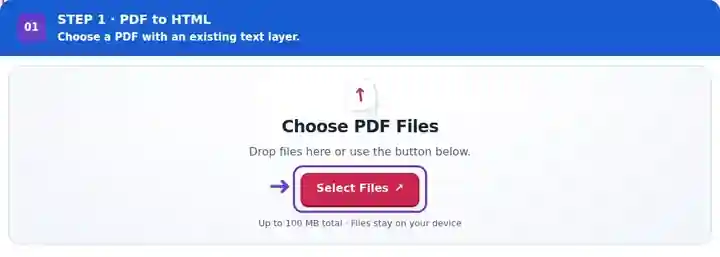
Set the source pages and optional download name.
Select the screenshot to enlarge it.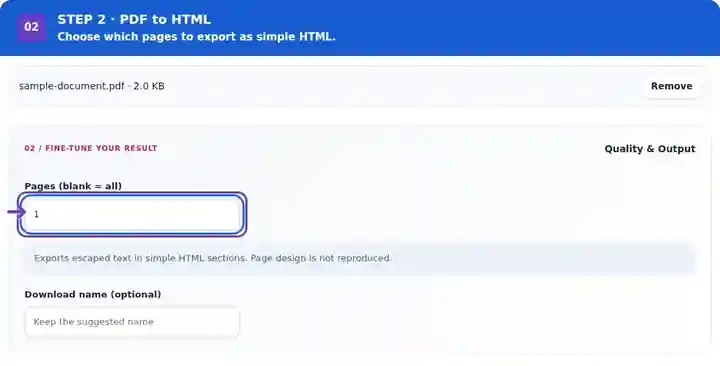
Download the HTML and check its page-labelled text sections.
Select the screenshot to enlarge it.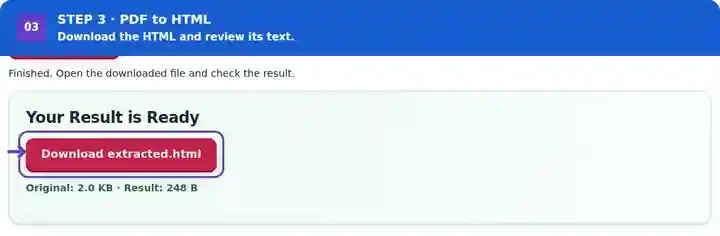
Screenshots show this toolkit using harmless sample files. Your file name, page count and settings may differ.
| Setting | What to expect |
|---|---|
| Accepted input | |
| Processing location | Your browser |
| File selection | One input file |
| Input size | 100 MB total; decoded images and pages also have pixel limits |
| Page selection | Up to 200 selected pages per job. Blank Pages means all pages only when the PDF has 200 pages or fewer; use separate ranges for a longer document. |
This export needs an existing text layer. Scanned pages require checked OCR before their wording can appear in the generated HTML.
A printed page boundary rarely identifies a complete web section. When editing the export, place paragraphs under headings that describe their subject, give a real table its proper row and column markup, and supply explanatory text for important diagrams. The generated preformatted text is a reference to edit rather than proof that the original document is now a finished web page. Check the wording against the PDF before removing source page labels.
| Situation | What to do |
|---|---|
| The page design is missing | This is text-to-HTML export from PDF, not visual layout reconstruction. |
| A scanned page has no content | Add and verify an OCR text layer first. |
| Characters resemble HTML code | They are deliberately escaped so extracted document content is not executed. |
A printed title such as “Project plan” can appear inside the export’s pre text. After confirming that it is the document title, an editor could mark it as <h1>Project plan</h1> and place the following prose in p elements. Choose structure from the meaning of the text, not merely where the PDF page ends.
Create a simple HTML document from the PDF text layer.
Settings used: {"range": "1", "dpi": "72"}
Compare the source and result before relying on this tool. This sample checks a bounded operation; output mode and document-structure limitations still apply.
Checked on . Small synthetic sample processed with release 3.23.0 in Chromium 153. This is a recorded local check, not a live-host or every-document guarantee.
This export includes escaped extracted text. Images, live links and the original page styling are not rebuilt.
Review its content, accessibility and formatting first. Add a suitable web layout rather than treating extracted text as a complete site.
Yes. Open the downloaded file in a text or HTML editor. Review extracted characters and add suitable structure before using it in a published page.
Continue with HTML to PDF, OCR PDF, PDF to Text.