AES-256 Opening Encryption
The output requires the new password in a compatible PDF reader. This is access control for the generated copy.

Encrypt a PDF with an opening password using AES-256.
Drop files here or use the button below.
Up to 100 MiB total · Files stay on your device
Preview the document here. For added content, this is a placement guide; check the saved output.
Add an opening password to an unencrypted PDF using AES-256 encryption processed locally in your browser. The result is a separate encrypted copy for compatible PDF readers. Choose this tool when a recipient should enter a password before viewing the document.
An opening password controls access to the downloaded copy; it does not authenticate the author or remove private information from the pages. Anyone who knows the password can read the content and may share it. Keep the source and password through your normal document-handling process.
The output requires the new password in a compatible PDF reader. This is access control for the generated copy.
The PDF processor runs in your browser; the conversion does not send the document to an external conversion API.
Passwords must fit 1–127 UTF-8 bytes and contain no line breaks. Use a long password that is not reused for another account; the accepted minimum is a technical limit, not a strength recommendation. If the source is already encrypted, use its known password with Unlock PDF first. Rewriting an already signed PDF can invalidate its certificate-based signature.
Create an encrypted copy and retain your source separately. The tool does not keep a password-recovery record.
Password protection is useful when a specific recipient needs a portable file that cannot be opened casually by someone else who obtains the attachment. For a draft financial report, for example, the encrypted copy can travel through the agreed delivery channel while the password is communicated separately. Once a recipient opens it, ordinary sharing restrictions depend on that recipient’s behavior; the tool supplies an opening password rather than ongoing identity-based access control.
Prepare a routine statement copy that requires an opening password for its intended recipient. Confirm the recipient can open the file and retain the original through the established records process.
Share an individual administrative letter with a known recipient. Check the exact file before encrypting it, then verify the password prompt on the downloaded copy.
Send a financial report to an accountant through an agreed workflow. Store the password reliably and test the final file before the delivery deadline.
Choose the unencrypted PDF you want to protect.
Select the screenshot to enlarge it.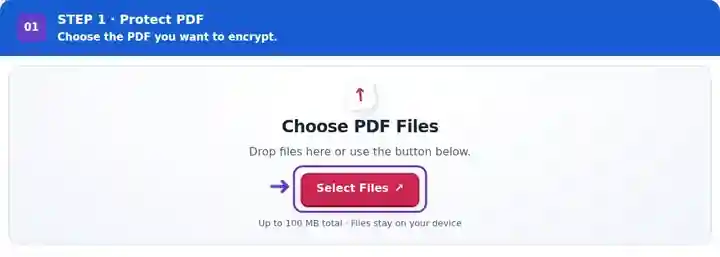
Enter and securely retain the new opening password.
Select the screenshot to enlarge it.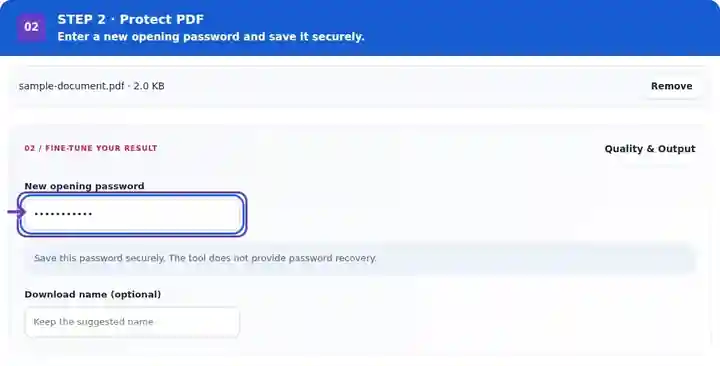
Download the protected copy and test its password prompt.
Select the screenshot to enlarge it.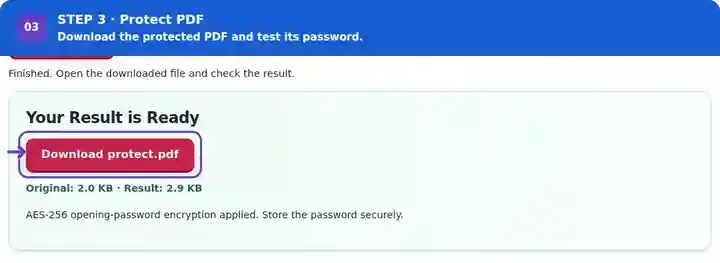
Screenshots show this toolkit using harmless sample files. Your file name, page count and settings may differ.
| Setting | What to expect |
|---|---|
| Accepted input | |
| Processing location | Your browser, on your device |
| File selection | One input file |
| Input size | Up to 100 MB, subject to device memory and decoded-page limits |
The password field is cleared when processing finishes or fails, when you cancel the job or when you clear the files. The temporary processing worker is terminated after the job. This uses ordinary browser-memory cleanup; it is not a certified secure-erasure process.
Close the downloaded document and open that exact output file again. Confirm that an incorrect password fails and the saved correct password succeeds. A viewer may keep an already unlocked document in memory, so a view of the source is not evidence that the new copy is encrypted. Try the intended recipient’s PDF reader as well; older software may not support AES-256 encryption. Keep the source available because the tool cannot recover a forgotten output password.
| Situation | What to do |
|---|---|
| A viewer cannot open the protected output | Confirm the exact password and try a viewer that supports AES-256 PDF encryption. |
| You forgot the new password | Use your retained original. This toolkit does not recover unknown passwords. |
| The source is already encrypted | Create an authorized unlocked copy before applying a new opening password. |
A small business can prepare a monthly report for its accountant, encrypt the approved copy and label it with the reporting period. Record which source was protected so a corrected report can be regenerated later. When an older recipient application cannot handle AES-256, agree on a compatible reader or a different approved delivery method before sending confidential content.
Encrypt a PDF with an opening password using AES-256.
Settings used: {"password": "Fixture-Only-3230"}
Compare the source and result before relying on this tool. This sample checks a bounded operation; output mode and document-structure limitations still apply.
Checked on . Small synthetic sample processed with release 3.23.0 in Chromium 153. This is a recorded local check, not a live-host or every-document guarantee.
This tool provides no recovery service. Store the password securely and keep an appropriate original copy.
Support varies, particularly in older software. Test the protected file in the recipient’s intended reader.
No. Encryption restricts opening. Certificate-based signatures address document authentication through a different mechanism.
An opening password is not continuing access control. A recipient who knows it can view the document and may copy, print or share the visible content. Use an appropriate managed-sharing system when revocable access or identity-based permissions are required.
Continue with Unlock PDF, Sign PDF, Password-Protected PDF.