Draw with a Mouse, Pen or Finger
Use the signature drawing area to create a mark. Clear the pad to start again; a retained drawing takes priority over an uploaded image.

Draw or upload a signature and place its visible mark on a page.
Drop files here or use the button below.
Up to 100 MiB total · Files stay on your device
Preview the document here. For added content, this is a placement guide; check the saved output.
Place a visible signature mark on a PDF by drawing it in the signature area or uploading a PNG/JPG image. This is convenient when a document accepts a drawn or scanned signature and you want to avoid printing and scanning the entire form.
The mark is inserted as an image. It contains no signing certificate, identity verification, trusted timestamp or audit trail, and it is not proof that the file is unaltered. Check whether the recipient accepts an image signature for this document.
Use the signature drawing area to create a mark. Clear the pad to start again; a retained drawing takes priority over an uploaded image.
Choose a PNG or JPG instead of drawing. A transparent PNG can give a clean background while keeping the mark separate from the surrounding page artwork.
Set Pages explicitly for the signature line. The initial selection is page 1; leaving the range blank would apply the same mark throughout the document.
Move the mark using Left position and Top position percentages. Set Image width so the full mark fits the line without covering the nearby date or labels.
Load the PDF and set Pages to the physical position of the signature line.
Select the screenshot to enlarge it.
Draw or upload a signature, then adjust its position and image width.
Select the screenshot to enlarge it.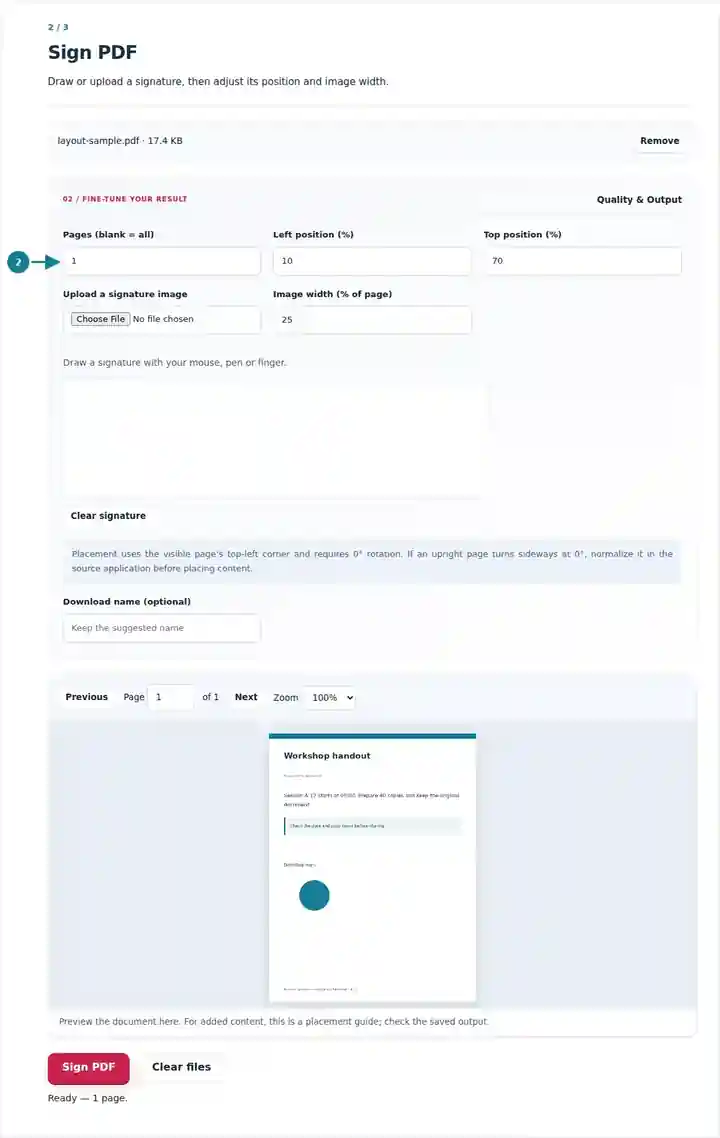
Download the signed copy and check the mark on the intended page.
Select the screenshot to enlarge it.
Screenshots show this toolkit using harmless sample files. Your file name, page count and settings may differ.
| Setting | What to expect |
|---|---|
| Accepted input | |
| Processing location | Your browser |
| File selection | One PDF |
| Input size | 100 MB total; decoded images and pages also have pixel limits |
| Document length | Up to 500 input pages. Selecting a small range does not bypass this source-document limit. |
The default selected page is page one. Change it explicitly for a signature elsewhere. Use pages with 0-degree rotation and avoid placing the image outside the visible page. Keep a copy before signing if more edits are planned. This action requires pages with 0° rotation. If changing an upright page to 0° turns it sideways, normalize the page in the source application first. Rotate PDF.
When a recipient accepts a drawn or scanned signature, placing the image on an existing form can avoid printing, signing and rescanning the whole document. It keeps the surrounding page artwork in its existing form while adding the visible mark to the chosen page.
A participant can add their own visible mark to a club or workshop form when the organizer accepts that format. Check that the correct name, date and page are present; use the organizer’s required system if image signatures are not accepted.
A freelancer can place a mark on a routine receipt or acknowledgment when the recipient permits it. Review the completed document before sharing and retain the unsigned copy if later corrections are requested.
A team member can add a permitted visible mark to a non-sensitive internal form. Documents that require an authenticated signing workflow need that approved workflow; this image-placement tool does not supply it.
| Situation | What to do |
|---|---|
| The drawn mark looks too thick or too large | Clear the drawing and use a smaller output width, or upload a prepared transparent image. |
| The signature is clipped | Move it inward or reduce its width so the full image fits the visible page. |
| A previously signed PDF reports changes | Any later modification can affect existing signature validation. Keep the original signed file. |
For a three-page form whose signature line appears last, set Pages to 3 and place your mark inside that line. Inspect the full image, date and surrounding text in the downloaded copy. Pages 1 and 2 should remain without the mark. If the recipient requests a certificate-based signature, use their required signing process instead of treating this visible image as equivalent.
Draw or upload a signature and place its visible mark on a page.
Settings used: {"range": "1", "x": "10", "y": "15", "scale": "20"}
Compare the source and result before relying on this tool. This sample checks a bounded operation; output mode and document-structure limitations still apply.
Checked on . Small synthetic sample processed with release 3.23.0 in Chromium 153. This is a recorded local check, not a live-host or every-document guarantee.
No. It adds a visible signature image. Certificate signing requires a separate signing system.
The drawing pad supports pointer input, including touch. An uploaded signature image is an alternative.
Clear the drawing first if you want to use an uploaded image. A retained drawing takes priority.
Continue with Fill PDF Forms, Edit PDF, Digital Signature vs Electronic Signature.