Explicit Channel Order
Choose RGB or BGR to match the program that will read the data. Both layouts contain the same rendered colors; only the order of the three channel bytes changes.

Export headerless RGB or BGR page pixels with exact layout metadata.
Drop files here or use the button below.
Up to 100 MiB total · Files stay on your device
Preview the document here. For added content, this is a placement guide; check the saved output.
This tool renders PDF pages and saves their pixels as headerless, interleaved, 8-bit RGB or BGR data. Every pixel contributes three bytes. Rows run from left to right and from the top of the image to the bottom, with no header or row padding.
The output is not camera sensor RAW such as CR2, NEF or ARW. A PDF cannot recover the original measurements from a camera sensor. The download therefore includes a JSON sidecar describing the exact layout needed to read each rendered pixel file correctly.
Choose RGB or BGR to match the program that will read the data. Both layouts contain the same rendered colors; only the order of the three channel bytes changes.
The ZIP includes layout.json with filenames, pixel dimensions, channel order, bit depth, row direction and byte counts. Keep it beside the pixel files when moving the download.
Export selected pages independently. Pages with different sizes or rotations receive their own dimensions in the sidecar instead of being forced into one shared canvas.
The .raw entries contain direct channel values without an image-file header. Extract them from the losslessly compressed ZIP before importing.
Select a PDF and decide which page images to export.
Select the screenshot to enlarge it.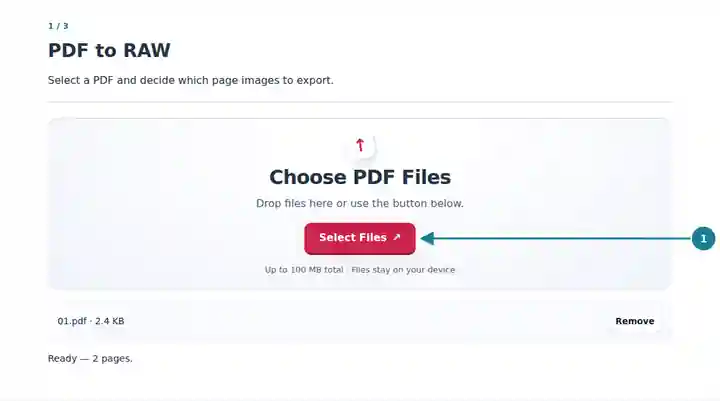
Choose resolution and RGB or BGR channel order.
Select the screenshot to enlarge it.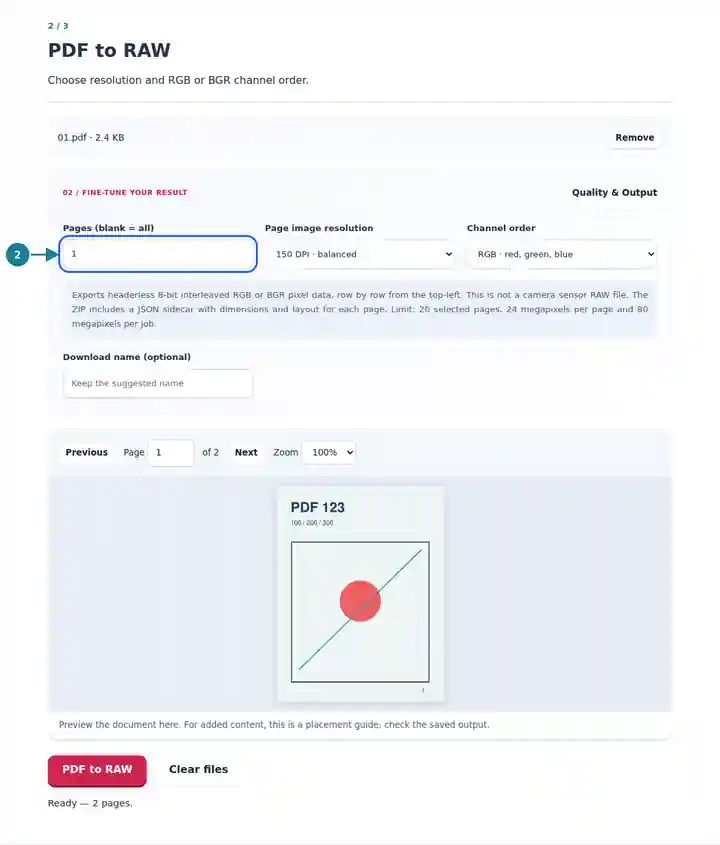
Download and extract the ZIP with its pixel files and layout.json.
Select the screenshot to enlarge it.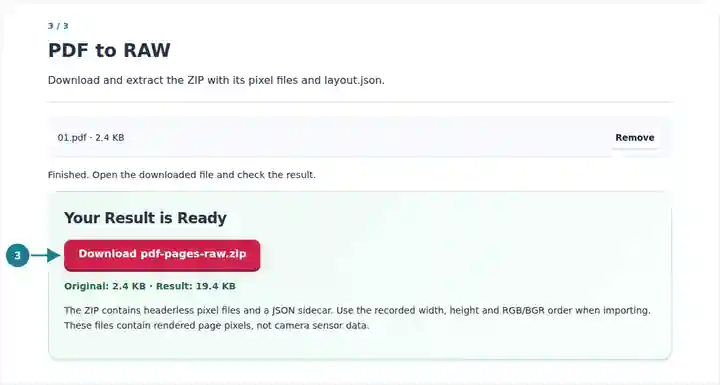
Screenshots show this toolkit using harmless sample files. Your file name, page count and settings may differ.
Headerless pixel data is useful for image-processing experiments, custom visualization programs and import pipelines that require a known byte layout. Removing an image header also removes the information a normal viewer would use to interpret the data. The sidecar is therefore part of the usable result, not an optional description. For routine viewing or sharing, PNG or TIFF is usually easier.
Feed rendered page pixels into a program that explicitly accepts interleaved RGB or BGR arrays.
Compare channel order, byte counts and raster dimensions using a reproducible page image.
Prepare a small, documented raster sample for checking a custom image import process.
| Setting | What to Expect |
|---|---|
| Input | One PDF up to 100 MiB with no more than 500 source pages. |
| Selection | Up to 20 selected pages, 24 megapixels per page and 80 megapixels per job. |
| Pixel Format | Three interleaved 8-bit channels in RGB or BGR order, with no alpha channel, header or row padding. |
| Download | One ZIP containing page-numbered .raw files and a JSON layout sidecar, even for one selected page. |
A rendered page that is 1,000 pixels wide and 800 pixels high contains 2,400,000 bytes of RGB data: 1,000 × 800 × 3. Enter those dimensions and the recorded order in RAW to PDF using headerless mode. If the byte count differs, check that you selected the extracted .raw entry rather than the ZIP or sidecar.
| Situation | What to Check |
|---|---|
| An image viewer will not open the file | Use an importer that supports headerless RGB/BGR and supply the sidecar settings, or export PNG for an ordinary image viewer. |
| Red and blue appear swapped | Check whether the importer is expecting RGB while the sidecar specifies BGR, or the reverse. |
| The image is skewed or wrapped | Verify width, height, three channels and zero row padding. A wrong row width changes where every following line begins. |
Export headerless RGB or BGR page pixels with exact layout metadata.
Settings used: {"range": "1", "dpi": "72"}
Compare the source and result before relying on this tool. This sample checks a bounded operation; output mode and document-structure limitations still apply.
Checked on . Small synthetic sample processed with release 3.23.0 in Chromium 153. This is a recorded local check, not a live-host or every-document guarantee.
No. It exports rendered page pixels. It does not create a camera model file, a Bayer mosaic or original sensor measurements.
Headerless files do not contain dimensions or channel descriptions. The sidecar records those facts so the bytes can be interpreted without guessing.
Yes. Extract a .raw file, choose headerless RGB/BGR mode in RAW to PDF and enter its recorded dimensions and order. The resulting PDF contains the rendered image, not the original PDF objects.