Choose the File Sequence
Move an entire source file earlier or later before merging. Put the main document ahead of its attachments so the finished packet reads in the intended order.

Combine selected PDFs in the file order you choose.
Drop files here or use the button below.
Up to 100 MB total · Files stay on your device
Preview the document here. For added content, this is a placement guide; check the saved output.
Build one document from separate PDFs while controlling file order and the pages taken from each source. A useful example is a submission packet containing a cover letter, application and supporting evidence. The merger copies selected page objects into a new document rather than converting each page into a photograph.
File order and page order are different settings. Moving a source file earlier moves its entire selected section. Entering a range beside that file limits the section to those pages. Mixed page sizes stay mixed, so a landscape spreadsheet can follow a portrait letter without forcing either onto a new paper size.
Move an entire source file earlier or later before merging. Put the main document ahead of its attachments so the finished packet reads in the intended order.
Each file has its own Pages field. Include a cover, a chapter or several nonconsecutive pages without bringing every page of that source into the output.
A portrait letter and a landscape table can remain different sizes in the combined PDF. Merging does not force the pages onto A4 or stretch their artwork.
The merger copies page objects into a new PDF rather than photographing every page. Ordinary text and vector content do not need a lower-resolution replacement.
Select the PDFs; their order in the file list becomes the document order.
Select the screenshot to enlarge it.
Move sources with the up/down buttons and set an optional Pages range for each file.
Select the screenshot to enlarge it.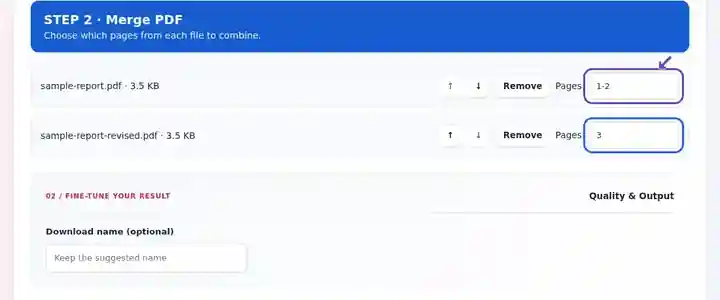
Download the merged PDF and check page count and every source-file boundary.
Select the screenshot to enlarge it.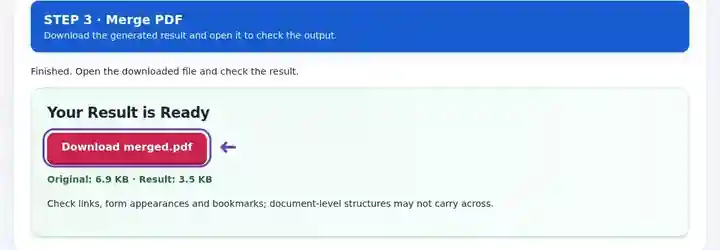
Screenshots show this toolkit using harmless sample files. Your file name, page count and settings may differ.
| Setting | What to expect |
|---|---|
| Accepted input | |
| Processing location | Your browser |
| File selection | 2–20 PDF files; up to 500 source pages in total |
| Input size | 100 MB total; decoded images and pages also have pixel limits |
Copied pages usually retain their visible content. Document-level bookmarks, attachments, signatures and interactive form relationships may not carry over correctly. Use flattened copies when the appearance of completed forms matters more than their editability.
A single packet makes it easier to follow a submission that would otherwise arrive as several attachments. The benefit is a clear reading sequence: the explanation comes first, and the evidence immediately follows it. Merge only material that belongs together; a recipient who needs separate documents may prefer a split packet.
An applicant can place a cover statement, portfolio excerpts and public course certificates into one submission. Keep the order required by the application instructions, and check that each selected certificate is complete before sending the packet.
A trainer can put a fictional customer question before its product sheet and worked rate calculation. Check that the effective dates agree and that each explanation stays beside the figures it uses. This creates a coherent banking lesson instead of a loose bundle of examples.
A coordinator can combine a site-report summary, approved drawing excerpts and a materials schedule. Preserve landscape drawing pages and review revision labels at every file boundary so an older attachment does not quietly enter the final issue.
| Situation | What to do |
|---|---|
| Only part of a statement is needed | Enter its physical PDF page numbers in that file’s Pages field, such as 2-4. A printed page label may differ from its position in the file. |
| A page is in the wrong place | Use Organize PDF after merging when you need to move a page within a document, rather than moving the whole source file. |
| The combined file is larger than expected | Merging retains page content. It is not compression. Inspect images and then use an available compression tool on a copy. |
Suppose a two-page cover document accompanies a larger report, but only report pages 3-7 belong in the submission. Keep the cover’s Pages field blank and enter 3-7 beside the report. The download should contain seven pages. Check that the second cover page is followed by the intended report page, and that the excerpt includes its ending and explanatory notes.
Yes. Set a page range beside that source file. Leave its range empty to include every page.
No. Each copied page keeps its dimensions. Use Resize PDF afterward if the recipient requires a uniform paper size.
A cryptographic signature authenticates a particular document. Creating a combined document does not preserve that original document’s authentication.
Continue with Organize PDF, Add PDF Page Numbers, Flatten PDF Forms.