Saved Composite Reading
Share the stored page appearance without exporting individual layers. Make sure the PSD was saved after the latest edits and includes a compatible composite image.

Place an 8-bit RGB or grayscale PSD composite into a PDF page.
Drop files here or use the button below.
Up to 50 MiB total · Files stay on your device
Preview the document here. For added content, this is a placement guide; check the saved output.
The converter reads the composite image saved inside a compatible PSD and places it on a PDF page. It uses that flattened view instead of rebuilding individual layers, adjustments, masks or smart objects.
Use an 8-bit RGB or grayscale PSD with a saved composite. Raw, PackBits RLE and ZIP composite streams are supported. CMYK, Lab, 16-bit and 32-bit PSDs, and the separate PSB large-document format, are rejected instead of being silently converted with unsupported settings.
Share the stored page appearance without exporting individual layers. Make sure the PSD was saved after the latest edits and includes a compatible composite image.
Choose A4, US Letter or an image-sized page. Portrait and landscape options apply to fixed paper sizes, while margins control the space around the image.
The composite fits within the available page area without stretching. Extra space can remain on two sides when the image and paper have different proportions.
Read the PSD and create its PDF locally. No Photoshop account or document upload to a conversion service is needed.
Choose a PSD containing a saved RGB or grayscale composite.
Select the screenshot to enlarge it.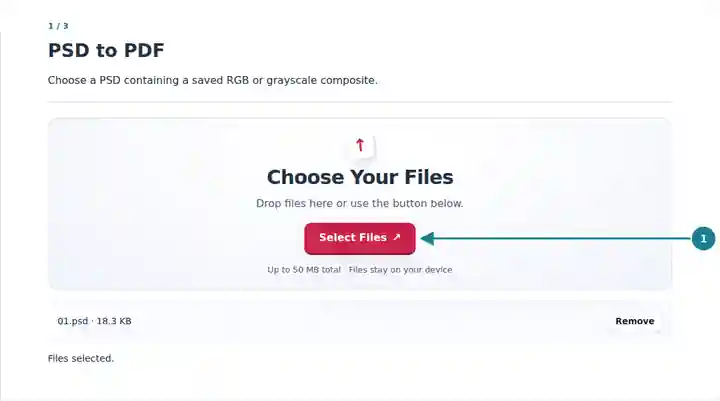
Set paper size, orientation and margins for the composite image.
Select the screenshot to enlarge it.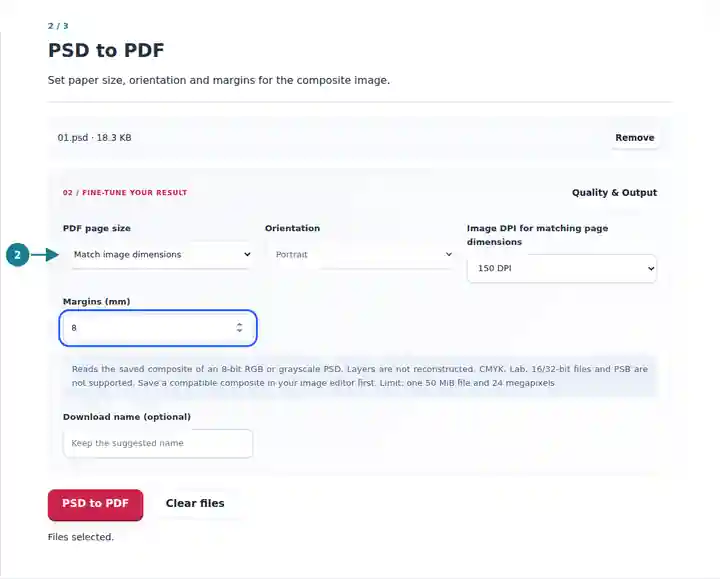
Download the completed PDF and compare the image with its source.
Select the screenshot to enlarge it.
Screenshots show this toolkit using harmless sample files. Your file name, page count and settings may differ.
A PDF image page is convenient for a review attachment or layout discussion when the recipient needs to see the saved design. It does not provide editable source layers. Embedded color profiles are not converted, so use the source application for a calibrated, color-managed print proof or a workflow requiring original editing data.
Create a simple view of the saved design for colleagues who do not need its editable layers.
Prepare a visual reference for feedback while keeping the working PSD as the editable master.
Distribute an image of a design exercise without requiring learners to open the source layer stack.
| Setting | What to Expect |
|---|---|
| Input | One PSD up to 50 MiB, with no more than 24 megapixels in its composite. |
| Supported Image | 8-bit RGB or grayscale PSD with a complete saved composite; extra spot channels are not transferred. |
| Page Layout | A4, US Letter or image-sized pages, with margins from 0 to 100 mm where space permits. |
| Image-Sized Pages | 72, 150 or 300 image DPI controls physical image size. Margins add space around that image. |
For a landscape mockup, select US Letter in landscape orientation and add a small margin. The image is scaled proportionally to fit. If you need the pixel image to have a particular physical size instead, choose the image-sized option and its DPI; increasing DPI makes the same pixels occupy a smaller area.
| Situation | What to Check |
|---|---|
| The file uses an unsupported mode | Save an 8-bit RGB or grayscale copy with a composite in the source editor, then choose that copy. |
| The composite does not reflect recent edits | Save the updated source again with compatibility enabled. The converter can only read the composite contained in the selected file. |
| Margins leave no usable page area | Reduce the margins or choose a larger page layout. The image must have a positive area in which to fit. |
Place an 8-bit RGB or grayscale PSD composite into a PDF page.
Settings used: {"range": "1", "dpi": "72"}
Compare the source and result before relying on this tool. This sample checks a bounded operation; output mode and document-structure limitations still apply.
Checked on . Small synthetic sample processed with release 3.23.0 in Chromium 153. This is a recorded local check, not a live-host or every-document guarantee.
No. The PDF contains a single composite image on its page. Text layers, masks, adjustment settings and smart objects are not exported as editable PDF objects.
Those inputs are not supported by this tool. Export a compatible 8-bit RGB or grayscale PSD copy, or create the PDF directly in your source application.
No. The output contains the decoded composite image, not the original PSD attachment or its editing metadata. Keep the source file separately.